
Last updated on
Oct 28, 2026

AU Form 20 - Torres Strait Islander Land 2011-2026 free printable template
We are not affiliated with any brand or entity on this form

Fill out
Complete the form online in a simple drag-and-drop editor.

eSign
Add your legally binding signature or send the form for signing.

Share
Share the form via a link, letting anyone fill it out from any device.

Export
Download, print, email, or move the form to your cloud storage.
Why pdfFiller is the best tool for your documents and forms


End-to-end document management
From editing and signing to collaboration and tracking, pdfFiller has everything you need to get your documents done quickly and efficiently.
Accessible from anywhere
pdfFiller is fully cloud-based. This means you can edit, sign, and share documents from anywhere using your computer, smartphone, or tablet.
Secure and compliant
pdfFiller lets you securely manage documents following global laws like ESIGN, CCPA, and GDPR. It's also HIPAA and SOC 2 compliant.
What is AU Form 20 - Torres Strait Islander Land
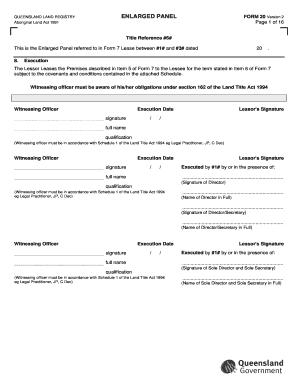
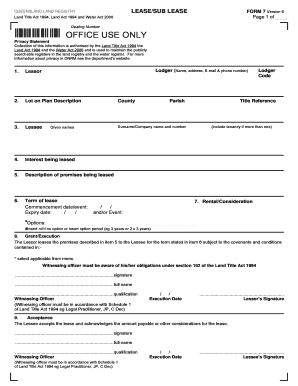
The Queensland Land Registry Enlarged Panel Form 20 is a legal document used by lessors and lessees in Queensland, Australia, to formalize land leases under the Torres Strait Islander Land Act 1991.
pdfFiller scores top ratings on review platforms




So far it's great. I'm not planning on completing a passport application for my grandson. Hope it works.
Wonderful, I cannot write because of my MS so this helps me tremendously.
Who needs AU Form 20 - Torres Strait Islander Land?
Explore how professionals across industries use pdfFiller.

AU Form 20 - Torres Strait Islander Land is needed by:
-
Property lessors in Queensland.
-
Tenants or lessees seeking land lease agreements.
-
Witnessing officers required for lease execution.
-
Legal representatives facilitating lease agreements.
-
Directors and secretaries involved in property management.
Comprehensive Guide to AU Form 20 - Torres Strait Islander Land
What is the Queensland Land Registry Enlarged Panel Form 20?
The Queensland Land Registry Enlarged Panel Form 20 is a critical legal document utilized in Queensland, Australia, for leasing land under the Torres Strait Islander Land Act 1991. This form formalizes lease agreements by outlining essential elements such as the premises description, terms of the lease, and the roles of involved parties. Understanding this form is crucial for those engaging in land transactions within the state.
Key components of this form include the detailed description of the premises being leased, which ensures clarity regarding the property's location and boundaries. Additionally, the document delineates specific roles, including the lessor, lessee, and witnessing officers, each of whom must sign to validate the agreement. Legal compliance is paramount, as proper completion of the form safeguards the interests of all parties involved.
Purpose and Benefits of the Queensland Land Registry Enlarged Panel Form 20
The primary purpose of the Queensland Land Registry Enlarged Panel Form 20 is to facilitate effective leasing agreements between lessors and lessees. By providing a standardized legal framework, this form helps ensure both parties are protected throughout the leasing process. The advantages of having this legal document include enhanced protection against disputes, as it clearly defines each party's obligations and rights under the lease.
Moreover, this form streamlines the transaction process related to land leases, reducing potential misunderstandings about terms and conditions. It serves not only as a legal safeguard but also as a practical tool that simplifies the complexities often associated with land leasing in Queensland.
Who Needs the Queensland Land Registry Enlarged Panel Form 20?
This form is essential for various stakeholders involved in the lease transaction. The primary parties are the lessor, who leases the property, and the lessee, who occupies the leased premises. Additionally, witnessing officers play a vital role in validating the lease agreement, especially when roles like Director or Sole Director and Sole Secretary are involved.
Scenarios necessitating the use of this form include residential leases, commercial land leases, and instances where specific legal requirements govern lease agreements. In each case, having the Queensland Land Registry Enlarged Panel Form 20 properly executed ensures legal protection for all parties.
Key Features of the Queensland Land Registry Enlarged Panel Form 20
The Queensland Land Registry Enlarged Panel Form 20 includes several key features designed to facilitate a smooth leasing process. Major components consist of fillable fields for vital information such as names, dates, and specific terms of the lease. Signature lines are prominently included, ensuring that all necessary parties can provide their consent easily.
-
Execution dates for both the lessor and lessee
-
Witnessing officer signature requirements
-
Compliance with Queensland registration laws to ensure legal validity
-
Clear formatting that guides users on how to fill out the form
These features collectively contribute to the form's effectiveness in maintaining legal integrity and clarity throughout the leasing process.
How to Fill Out the Queensland Land Registry Enlarged Panel Form 20 Online
To effectively complete the Queensland Land Registry Enlarged Panel Form 20 online using pdfFiller, follow these steps:
-
Access the form through pdfFiller's online platform.
-
Begin filling out the essential fields, including names and date fields.
-
Review all information entered for accuracy, ensuring compliance with legal requirements.
-
Sign the document electronically as required by your role (lessor, lessee, or witnessing officer).
-
Complete any additional fields prompted by the platform.
These tips will ensure that you properly fill out and submit the form, minimizing the risk of errors that could lead to complications in the leasing process.
Submission Methods for the Queensland Land Registry Enlarged Panel Form 20
After completing the Queensland Land Registry Enlarged Panel Form 20, you must submit it to the appropriate authority to ensure it is registered and legally binding. The completed form should be submitted to the Department of Environment and Resource Management in Queensland.
There are multiple delivery options available for submission:
-
In-person delivery at the designated department office
-
Postal mail submission
It’s important to be aware of any associated fees for submission and the expected processing times, which can vary based on the method of delivery chosen.
Common Errors and How to Avoid Them When Submitting the Queensland Land Registry Enlarged Panel Form 20
When submitting the Queensland Land Registry Enlarged Panel Form 20, it is crucial to avoid common errors that can lead to delays or rejections. Frequent mistakes include missing signatures, incorrectly filled details, or failing to adhere to submission requirements.
To help mitigate these issues, consider the following checklist before submission:
-
Ensure all required signatures are present
-
Verify that all details are correctly filled in
-
Confirm compliance with formal requirements
Taking the time to validate the information will help ensure a smooth submission process and protect against potential complications.
Security and Compliance Considerations for the Queensland Land Registry Enlarged Panel Form 20
Handling legal documents like the Queensland Land Registry Enlarged Panel Form 20 necessitates strong security measures to protect sensitive information. Data protection is paramount, and users should consider platforms that adhere to strict security standards.
pdfFiller employs various security measures for document handling, including:
-
256-bit encryption to protect your data
-
Compliance with SOC 2 Type II, HIPAA, and GDPR standards
Utilizing secure platforms for form completion and submission helps ensure that your information remains confidential and protected throughout the process.
How to Download and Save the Queensland Land Registry Enlarged Panel Form 20 PDF
Once the Queensland Land Registry Enlarged Panel Form 20 has been completed, downloading it for personal records is essential. To do this using pdfFiller, follow these steps:
-
Finalize your edits and review the document.
-
Select the download option within the program.
-
Choose from available formats for saving, such as PDF or DOCX.
-
Opt to save the file locally or use cloud storage for future access.
Using cloud storage provides easy access to your documents from any location, while local saving offers direct control over file management.
Engaging with pdfFiller to Complete Your Queensland Land Registry Enlarged Panel Form 20
Utilizing pdfFiller to complete the Queensland Land Registry Enlarged Panel Form 20 enhances the overall experience for users. The platform offers a user-friendly interface that makes filling out forms easy and efficient. With features such as eSigning and secure document handling, pdfFiller assists users in managing their real estate documents swiftly and accurately.
Choosing pdfFiller means benefiting from a secure and reliable way to handle your leasing agreements while ensuring compliance with relevant legal standards.
How to fill out the AU Form 20 - Torres Strait Islander Land
-
1.To begin, access pdfFiller and log in or create an account if you don't have one.
-
2.In the search bar, type 'Queensland Land Registry Enlarged Panel Form 20' and click on the form to open it.
-
3.Once the form is open, familiarize yourself with pdfFiller's interface, noting where the fillable fields are located.
-
4.Gather all necessary details, such as the property description, rent prices, and contact information of parties involved in the lease.
-
5.Start filling in the form by clicking on each relevant field. Enter the lessor's and lessee's names and their respective signatures.
-
6.If required, complete the signature and date fields for the witnessing officer and any additional signatories.
-
7.Review all sections of the form to ensure that each field has been accurately completed before finalization.
-
8.Once you are satisfied with your entries, use the options provided by pdfFiller to save or download the completed form.
-
9.You may choose to print it for physical signatures or submit it electronically via the method specified by the Queensland Land Registry.

Who needs to sign the Queensland Land Registry Enlarged Panel Form 20?
The form must be signed by the lessor, lessee, and a witnessing officer. Additional signatures may be required from directors or secretaries if applicable to your agreement.
What is the purpose of the Queensland Land Registry Enlarged Panel Form 20?
This form is used to establish and outline the terms and conditions of a land lease under the Torres Strait Islander Land Act 1991, ensuring legal validity.
Do I need to notarize this form?
No, the Queensland Land Registry Enlarged Panel Form 20 does not require notarization according to the provided metadata.
How do I submit the completed form?
The completed form must be registered with the Department of Environment and Resource Management in Queensland for it to take effect. Follow their submission guidelines.
What information is needed to fill out the form?
You will need details such as the property description, lease duration, rent, and the complete names and addresses of the lessor and lessee.
What are common mistakes to avoid when completing this form?
Common mistakes include missing signatures, incorrect property details, or failing to enter the required date fields. Double-check each entry before submission.
How long does it take to process the form?
Processing times can vary, but it typically takes several weeks. It's advisable to submit the form well in advance of your lease start date to prevent delays.
Related Content
Related Forms





Related Catalogs
Get the latest insights from our blog


If you believe that this page should be taken down, please follow our DMCA take down process
here
.
This form may include fields for payment information. Data entered in these fields is not covered by PCI DSS compliance.